Table of contents
TLDR
Similarly to a house, a website must rest on solid and functional foundations. Just as in construction, the web design choices made during website planning will affect its performance and, consequently, your business.
The Importance of Good Web Design
We’ve already discussed how important having a fast website is, how loading performance has become a ranking factor with Core Web Vitals, and how our site achieved a perfect score of 4×100 according to Google.
However, we haven’t highlighted yet the main elements affecting website speed and how they do so. Let’s compare a website to a house for a moment: in the event of an earthquake (or more precisely, a Google algorithm update), if both suffer “sudden damage,” it’s wise to analyze their infrastructure.
It all begins with web design: the design choices of a website can impact the site’s performance and a business’s performance. Considering the constant changes in algorithms and user behavior, it’s essential to make these choices carefully, going beyond personal preferences.
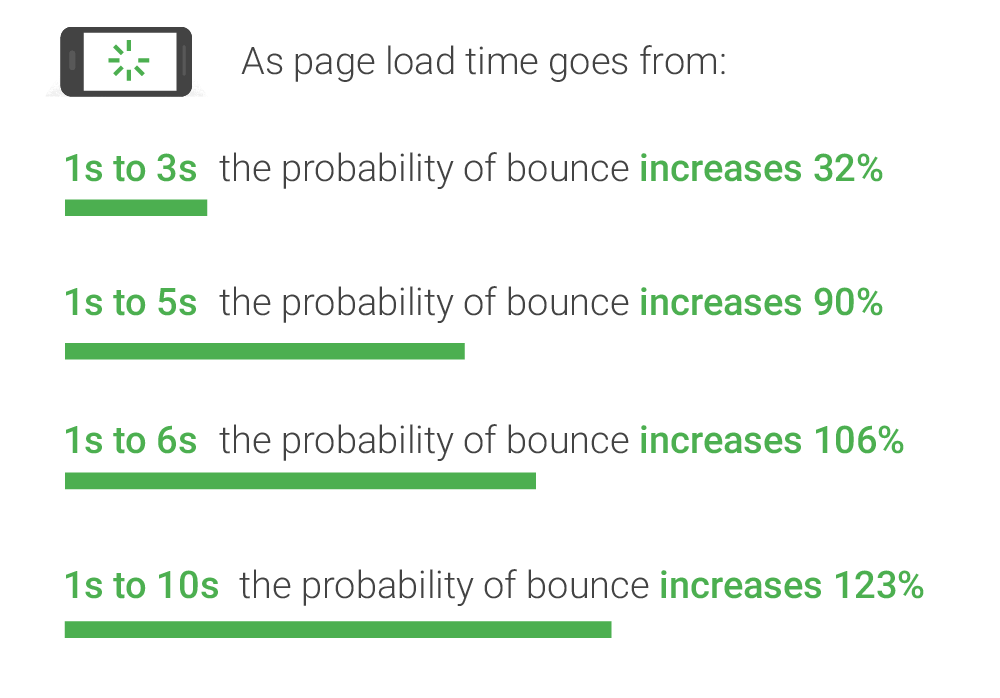
But what impact are we talking about? According to Google, 32% of users abandon navigation when a page takes 1 to 3 seconds to load, and the percentage increases significantly beyond 3 seconds.
Search engines aim to provide the best answers to their users in a few clicks.
Designing a website that offers easy and fast-to-navigate content not only aids organic search ranking but also improves User Experience and advertising.
The negative impact of a slow website on PPC campaigns should not be underestimated: if the page loading time is excessive, users are likely to abandon the site and access a competitor’s. The result? You paid for the user’s click on the ad but didn’t get any conversions.
A study by KissMetrics has highlighted that a 1-second delay in page response can lead to a 7% reduction in conversions. This means that if an e-commerce generates €100,000 per day, a 1-second delay in page responses would cost €2.5 million in lost sales annually.
Elements of Ineffective Web Design
Among the main elements affecting user experience, conversion optimization, and accessibility standards in website design, we find:
- Hero banners, images, and carousels that push content far below the above-the-fold area (the immediately visible area before scrolling);
- Large videos with autoplay and sometimes audio;
- Customized fonts from third parties not present on all devices;
- Graphic elements with inappropriate sizes, shapes, and colors for user accessibility;
- Layout not consistently formatted across devices (images, fonts, CTA buttons);
- Non-compliant or misconfigured cookie banners according to GDPR regulations.

However, this doesn’t mean it’s entirely wrong to have a slider on the homepage or that it’s never possible to use non-web-safe fonts; these are just a few of the countless recommended best practices for improving web performance.
Let’s take some domains as examples to understand which web design choices they’ve made and how they impact the site’s performance.
We’ve tested loading times and loading sequences of their homepages using well-known and frequently used tools: webpagetest.org and web.dev/measure. The test was conducted simulating an iPhone 6/7/8 with an LTE connection in Milan via Chrome.
Case Study #1: Fashion Brand

Visual appearance is crucial for a fashion e-commerce: in this case, using an image carousel is practically mandatory when compared to competitors. However, the loading time for the first slide is 4.5 seconds, exceeding the recommended 2.5 seconds for the Largest Contentful Paint (the largest element on the page).
In the first 3 seconds of loading, the only visible elements are the logo (with alt text), hamburger menu, cart icon, text for the search bar, and slider selector. However, these elements are difficult to see as they are black on a dark background.
A Call To Action pop-up to download the app is quickly covered by the cookie acceptance banner, which, however, causes a layout shift (CLS). The images in the slider also contribute to the low CLS score: the browser can’t determine image size until they’ve fully loaded.
Case Study #2: International NGO
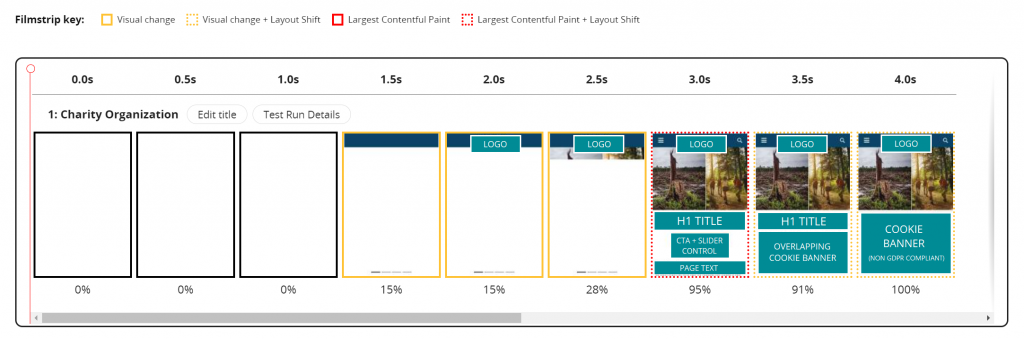
In this example, the total page loading time is better, although we can highlight some elements affecting download performance.
In addition to an image carousel that exceeds the recommended LCP limit, the website uses a custom font that must be downloaded before the page displays. The font alone takes about 4.5 seconds to download, limiting the loading of text content.
Some elements lack sufficient color contrast, and images don’t include alt text—both are accessibility drawbacks.
The cookie banner isn’t configured correctly: it still allows scrolling and doesn’t provide user choices, contradicting the new GDPR and ePrivacy directives that require cookie installation only with explicit user consent.
Case Study #3: Communication Agency

The last example demonstrates how even those “in the field” can make ineffective web design choices.
No elements appeared before the 3-second loading mark. The slider represents the Largest Contentful Paint and takes over 7 seconds to display the first image. Additionally, the images lack the lazy-load attribute for background downloading, thus consuming resources useful for page loading.
Four custom fonts are installed on the page, preventing text display until the resources are fully loaded. Consequently, the browser hides the text entirely for 14 seconds instead of showing a fallback character. Lastly, the cookie banner is not GDPR-compliant in this case as well.
Conclusion: Reaching a Win-Win Strategy
There can be countless reasons why a company or organization makes non-performance-friendly web design choices. Competition comparison, use of unreliable test tools, or fear of compromising the brand’s image.
However, it’s always possible to avoid some of these choices, for example:
- Opt for a static and optimized image for web navigation, using it as a background for the first content visible above the fold instead of videos or carousels;
- Use a web-safe font to avoid invoking too many resources from third parties;
- Favor a web design with a mobile-first and accessibility perspective to prevent layout shifts across devices and use graphics suitable for all users;
- Configure and update the cookie acceptance banner correctly.
As professionals, it’s our duty to help clients design websites with excellent loading performance that meet user expectations while maintaining an appealing and aesthetically pleasing design. A win-win strategy that allows the business to gain importance in the eyes of both users and search engines.
Discover our Case Studies and contact us at web@antartika.it for any information.
Table of contents