Table of contents
What is Dynamic Keyword Insertion?
Also known as DKI, Dynamic Keyword Insertion in Google Ads (formerly AdWords) is a feature that automatically includes the keyword that triggered the ad within the ad text.
This automation can be used by inserting the following code snippet into the ad:
{KeyWord:write your keyword here}
Google Ads will automatically replace it with the keyword that matches the user’s query. If the keyword exceeds the character limits set for ad headlines, Google Ads will use the keyword inside curly braces.
For instance, we could create an ad group containing keywords like “web agency Vicenza,” “web agency Padova,” and “web agency Verona,” and set up an ad with dynamic keyword insertion in the headline:
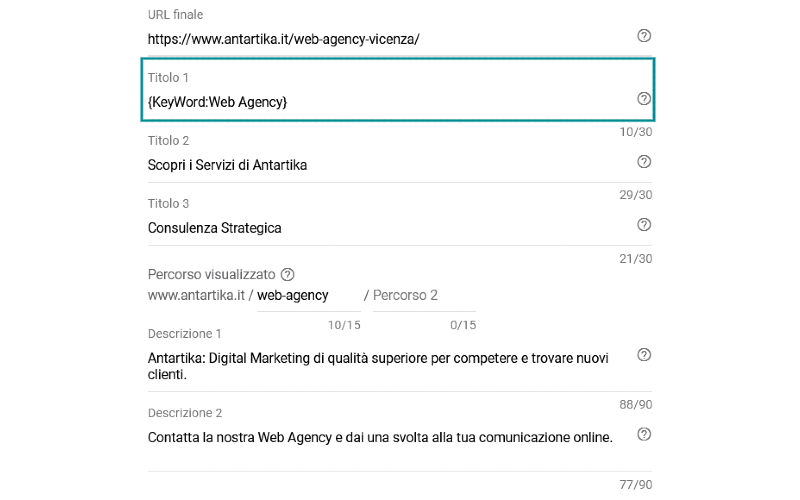
This way, Google Ads will replace the code snippet in the headline with the keyword that triggered the ad. For example, if a user searches for “web agency in Vicenza,” Google would display the following ad:

If another user searched for “web agency in Padova,” Google Ads would modify the published ad, inserting the keyword corresponding to the search terms used by the user:

If it’s not possible to insert the keyword that triggered the ad (for example, when the keyword is too long), Google Ads will use the keyword specified within the curly braces:

We can also modify the snippet in various ways to set the use of capital letters:
- {keyword:} to keep the entire text in lowercase (“web agency vicenza”);
- {Keyword:} to have a capitalized initial word (“Web agency vicenza”);
- {KeyWord:} to capitalize the first letter of each word (“Web Agency Vicenza”).
Benefits of Keyword Insertion
1. Increased Click-Through Rate (CTR)
By automatically modifying the text based on the user’s search terms, ads using dynamic keyword insertion become more helpful and relevant, leading to an increased CTR and improved keyword quality score.
Users are more likely to click on the ad when the text aligns with their search query.
2. Time saving
Creating specific ads for each keyword is a complex and time-consuming task. Utilizing this automation allows for obtaining relevant and user-friendly ads quickly and with less effort.
Challenges of Dynamic Keyword Insertion
Like any type of automation, dynamic keyword insertion has its challenges and can lead to more harm than good if used carelessly.
1. Generic Ads due to Long-Tail Keywords
If an ad group consists mostly of long-tail keywords, it’s likely that they exceed the character limit for ads. In such cases, Google Ads will always use the keyword specified within the curly braces of the snippet (since specific keywords can’t be inserted due to length constraints), resulting in generic and uninteresting ads for users.
2. Ads with Text Errors
Google Ads’ “Ad Preview and Diagnosis” tool is useful for identifying errors in ad text. For example, if the group contains keywords with spelling mistakes, these errors will also appear in the ad text, spoiling the user’s first impression.
Furthermore, if the dynamic keyword insertion code snippet is used incorrectly, it could result in outcomes like the following ad:

3. Ads with Competitor Names
Dynamic Keyword Insertion should be avoided if competitors’ brand names or products are included among the keywords. This could lead to the competitor’s name appearing in the ad text, potentially causing legal issues.
4. Irrelevant Ads Due to Broad Match
It’s important to remember that the user sees the keyword that triggered the ad, not their search query. If the ad group contains broadly matched keywords, they may be triggered without an actual match to the user’s search. This underscores the need to analyze all keywords in the Ad group and test results using Google Ads’ “Ad Preview and Diagnosis” tool.
Another important step is to create a comprehensive list of negative keywords for ongoing use (as explained in our previous article on negative keywords) to prevent ads from being triggered by irrelevant searches.
In conclusion, Google Ads’ keyword insertion feature is certainly a valuable automation tool for advertisers, but it can be detrimental if used carelessly. By using Google’s preview tools and carefully analyzing keywords in the group, highly specific and relevant ads can be generated, contributing to improved performance of your PPC campaign.
Table of contents