Table of contents
One of the most valuable pieces of information we can gather from Google Analytics 4 (GA4) is the origin of our website traffic: analyzing the channels used by visitors is not only fundamental to evaluating whether marketing activities are truly working, but also allows for the identification of potential opportunities.
Google Analytics offers different levels of detail for this type of analysis. In this article, we describe the three main methods to guide you toward a clearer and more conscious data reading.
Channel Groups: the first level of analysis
The starting point is the “Traffic acquisition” report (Reports > Lifecycle > Acquisition > Traffic acquisition).
Here we find the list of “Default Channel Groups”, which are macro-categories that GA4 uses to automatically classify traffic according to predefined rules.

The channels you will encounter most often in this report are:
- Organic Search: users coming from organic (non-paid) results of search engines like Google or Bing, for example, thanks to SEO activities.
- Paid Search: traffic from paid campaigns on search engines (e.g., Google Ads Search campaigns).
- Display: users coming from paid campaigns on the Google Display Network.
- Organic Social: non-paid traffic coming from social channels (Facebook, Instagram, Pinterest, TikTok, etc.).
- Paid Social: users coming from paid campaigns on social channels (e.g., Meta Ads).
- Referral: users who click on links on other websites that point to ours. In case of anomalous spikes in Referral traffic, we recommend investigating the presence of spam referrals.
- Email: clicks coming from newsletters or DEMs, provided they are correctly tracked via UTM parameters.
- Direct: often refers to users who manually typed our website URL into the search bar or clicked on a previously saved link (bookmark). An important note: Direct traffic is not always synonymous with loyal users; it can indicate incorrectly tracked campaigns or even monitoring issues. If you want to dive deeper into this point, we have written an article on interpreting Direct traffic.
- Unassigned: a value shown when GA4 cannot determine the channel of origin, often due to custom monitoring or unknown sources that do not match predefined rules (for example, some visits from AI tools). But beware: “Unassigned” often indicates that GA4 has not finished processing the data yet. It can take up to 48-72 hours before GA4 manages to retrieve information on the traffic source, so don’t worry if you see “Unassigned” traffic spikes from the previous day.
- Cross-network: traffic coming from advertising campaigns across multiple networks (e.g., Performance Max campaigns that show ads on multiple Google networks). Sometimes it can also indicate generic advertising traffic whose attribution is incomplete for various reasons (Consent Mode / privacy, loss of advertising IDs or the referrer, data processing still in progress).
This level of analysis is perfect for obtaining an initial snapshot and understanding which channels drive the most traffic and conversions to your website.
Source / Medium: the operational detail
To dive into the details and obtain information about the platform and the specific type of traffic, we can change the primary dimension of the GA4 report and switch from “Channel Groups” to “Session source / medium“:
- Source indicates which platform the user is coming from, such as: google, facebook, instagram, bing, linkedin, chatgpt.com, newsletter.
- Medium indicates the type of traffic, such as: organic (non-paid), cpc / ppc / paid (paid campaigns), email, referral.

Some examples of Source / Medium in GA4 reports might be:
- google / organic – Traffic from Google search results (non-paid)
- google / cpc – Traffic from Google Ads campaigns
- instagram / ppc – Traffic from Instagram campaigns
- bing / organic – Traffic from Bing search results (non-paid)
- m.facebook.com / referral – Traffic from Facebook (non-paid)
- anotherwebsite.com / referral – Traffic from a link on another website pointing to us
- newsletter / email – Traffic from newsletters
- chatgpt.com / referral – Traffic from a link in ChatGPT pointing to us
- ecc.
This level of analysis is very useful for identifying which platforms are generating the most visits and understanding whether it is organic or paid traffic: valuable information for making strategic evaluations and understanding the impact of our marketing activities.
Clearly, before drawing conclusions, it is essential to ensure that the data we are analyzing is complete and correct.
While some tools like Google Ads feature “auto-tagging” for links to signal the traffic source to Google Analytics, paid social campaigns and newsletters must be manually tagged using UTM parameters: without these parameters, GA4 will not be able to correctly recognize the source of this traffic, which will probably be assigned to the Direct channel.
If you are interested in learning more about this topic, we recommend our article that explains in detail what UTM parameters are and how to use them to track campaigns.
Session Campaign: the marketing level
If we have activated marketing campaigns (Google Ads, Meta Ads, newsletters, banners, collaborations, etc.), we can once again change the primary dimension of the “Traffic Acquisition” report in Google Analytics and select “Session campaign.”
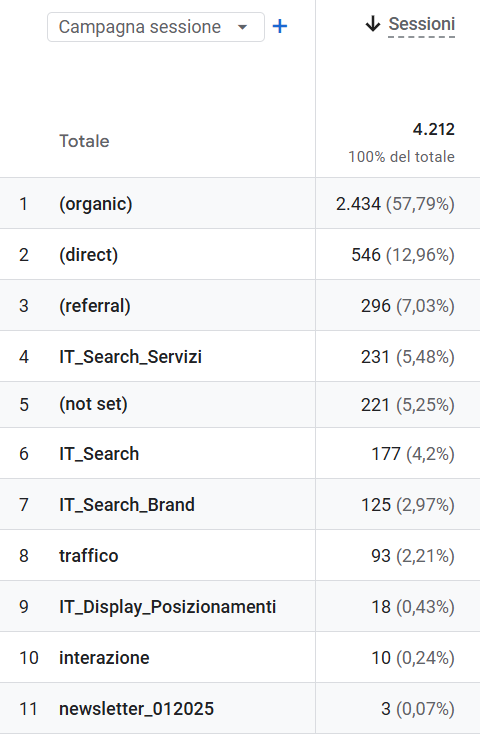
This level of analysis will allow us to understand which campaigns:
- brought the most traffic to the website,
- generated the most conversions,
- have the best ratio between investment and results.
In the case of traffic not originating from campaigns, a label will appear in parentheses, such as (organic), (direct), or (referral).
If you cannot find a specific campaign while analyzing the list, make sure that monitoring was implemented correctly—for example, via UTM parameters in the case of newsletters and social campaigns.
From data to strategy
Traffic channels are not just a table in Google Analytics; they are a snapshot of our marketing activities that tells us which investments are working best and which platforms deserve more attention.
However, to avoid misleading conclusions, the analysis of this data must be carried out consciously, avoiding common mistakes such as:
- interpreting the Direct channel exclusively as “brand” traffic;
- evaluating only the number of users and not their engagement or the conversions they generated;
- not using UTM parameters in marketing campaigns;
- comparing non-homogeneous periods (e.g., comparing a month of promotions with a month of standard activity);
- not keeping in mind that Google Analytics data represents only a portion of site traffic due to GDPR and privacy limitations;
- not knowing how to interpret GA4 metrics correctly (as in the case of a bounce rate that is too low or a number of pages per session lower than 1).
If you want to understand if your traffic is consistent with your business goals, or if you wish to identify new opportunities, contact our agency: we will help you interpret Google Analytics data strategically.
Table of contents