Table of contents
What is Direct traffic in Google Analytics? Is it truly just users who are already familiar with your brand? Let’s explore together how to accurately evaluate this channel.
An Overview of Acquisition Channels
One of the most useful sections in Google Analytics for assessing your web marketing strategy is the “Acquisition” category. Here, you can evaluate the performance of various channels that users use to access your site, such as:
- Organic = visits from search engines (e.g., Google)
- Referral = traffic from another website that links to yours
- Social = traffic from social networks
- Email = traffic from newsletters
- Paid Search = visits from paid search campaigns (e.g., Google Ads Search campaigns)
- Display = paid campaigns on display networks (e.g., Google Ads Display campaigns)
- Direct = users who have visited your site “directly” by typing its URL (but in this article, we’ll see why it’s not always the case!)
To distinguish the source of traffic, Google Analytics uses the browser’s referrer, a parameter that identifies the channel used by the user to access the website. The result you’ll find in Analytics is a pie chart like the one below:

The more “colorful” the chart, the more diverse the channels from which you’re getting visits – great news for your website, as it’s not overly dependent on a single traffic source.
Direct Traffic: What Is It?
Direct traffic should ideally include only visits from users who have directly entered the site’s URL in the search bar or clicked a bookmark after 6 months since the last access.
Considering this definition, Direct should indicate high-value traffic, consisting of users who are already familiar with your brand, are interested in it, and remember your website’s address, or have saved it as a browser bookmark.
However, we need to remember that the Direct channel also includes all the traffic that Analytics cannot classify.
In fact, direct traffic includes all those visits to the site that are initiated without the user’s browser communicating the referrer, which is the parameter used by Analytics to recognize the source channel. If Analytics cannot verify that the user is coming from known sources (search engines, social networks, other websites, paid traffic, etc.) or from campaigns with custom parameters, the visit will be attributed to the direct channel.
What Does Direct Traffic Include?
What are the most common cases in which a site visit is attributed to direct traffic? Let’s look at some examples together.
1. Directly Typed URLs or Bookmark Clicks
This is “real” direct traffic and of high value, where users who already know your brand directly enter your site’s address in the search bar or click on a bookmark after 6 months since their last visit.
2. Clicks on Links from Non-HTML Resources or Desktop Applications
Have you included a link to your site within a PDF, Word document, or PowerPoint presentation? If a user accesses the site through links that don’t come from web navigation, the visit will be attributed to the direct channel.
3. Clicks on Untracked QR Links or Links in Emails/Newsletters
If you don’t add UTM parameters for tracking, even users clicking on QR links, links in newsletters, or links in your email signature will be included in direct traffic.
4. Clicks on Links from HTTPS to HTTP
If a user moves from a secure site (HTTPS) to an insecure site (HTTP), their browser won’t communicate referrer information for security reasons. Consequently, if your site is still HTTP, you might detect a high percentage of direct traffic due to other HTTPS sites linking to yours, which Analytics cannot properly identify as a Referral.
5. Clicks on Links from Apps
Google Analytics is not yet able to recognize most smartphone apps as Referral sources, so users from this channel will be included in direct traffic. An exception is apps with integrated browsers (e.g., Google Search, Facebook, or Facebook Messenger) that open links within the app itself and pass all the necessary information to identify the correct traffic source.
6. Clicks on Links Shared via “Dark Social Media” (Chats, Instant Messaging)
The term “Dark social media” refers to content sharing privately through tools or instant messaging apps that prevent proper traffic source attribution. Examples include WhatsApp, Skype, or WeChat: if a user clicks on a link within these apps and accesses your site, their visit will be associated with the direct channel.
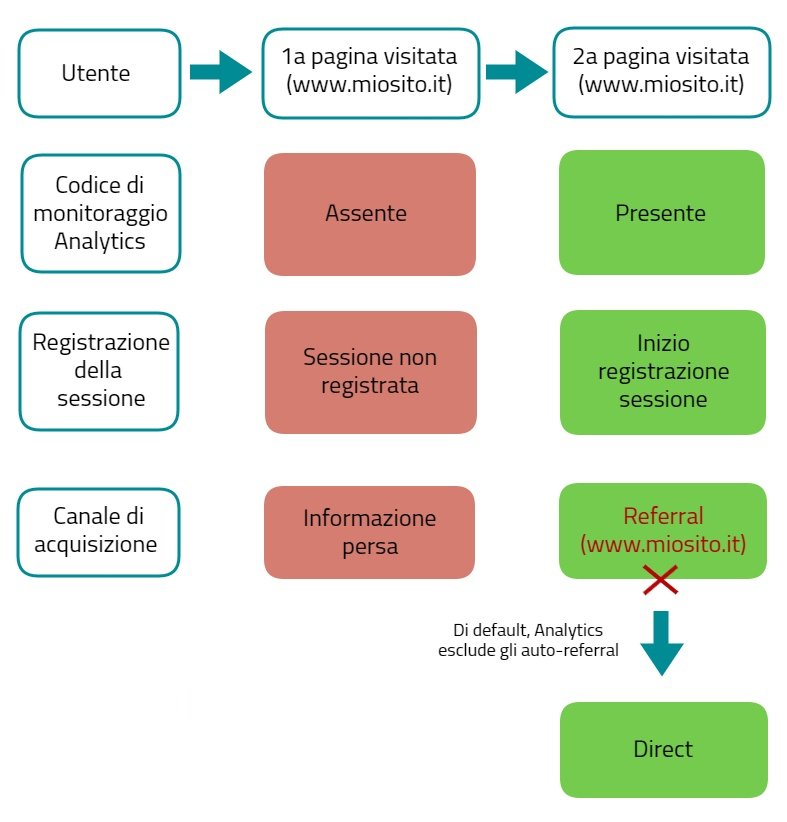
7. Transitions from a Page without Analytics Tracking to a Tracked Page (Within the Same Site)
It’s possible for a visit to be attributed to the direct channel due to an error in implementing Google Analytics tracking. For example, a user:
- accesses your site on a page where the Analytics tracking code isn’t present and
- from there, visits another page on the same site where tracking is active.
Analytics will record the session (user’s visit) starting from the second viewed page and read your site (the first viewed page) as the traffic source, losing the information about the real channel that brought the user to the site. In this case, the session should be attributed to the Referral channel (where your site is the Referral itself), but auto-referrals are excluded by default in Analytics. As a result, the visit will be attributed to the direct channel.
8. Page Reloads After Cookie Acceptance
If you’ve added a cookie consent banner to comply with GDPR, don’t reload the page after the user accepts the cookies.
The concept is the same as described in the previous point (transition from a page without Analytics tracking to a page with tracking):
- the user lands on a page where they haven’t accepted cookies, so Analytics tracking isn’t yet active;
- the user accepts the cookies;
- the page reloads;
- Analytics tracking starts, but due to the page reload, information about the real acquisition channel is lost, and the session should be attributed to the Referral channel (where your site is the Referral itself);
- since Analytics excludes auto-referrals by default, the visit will be attributed to the direct channel.
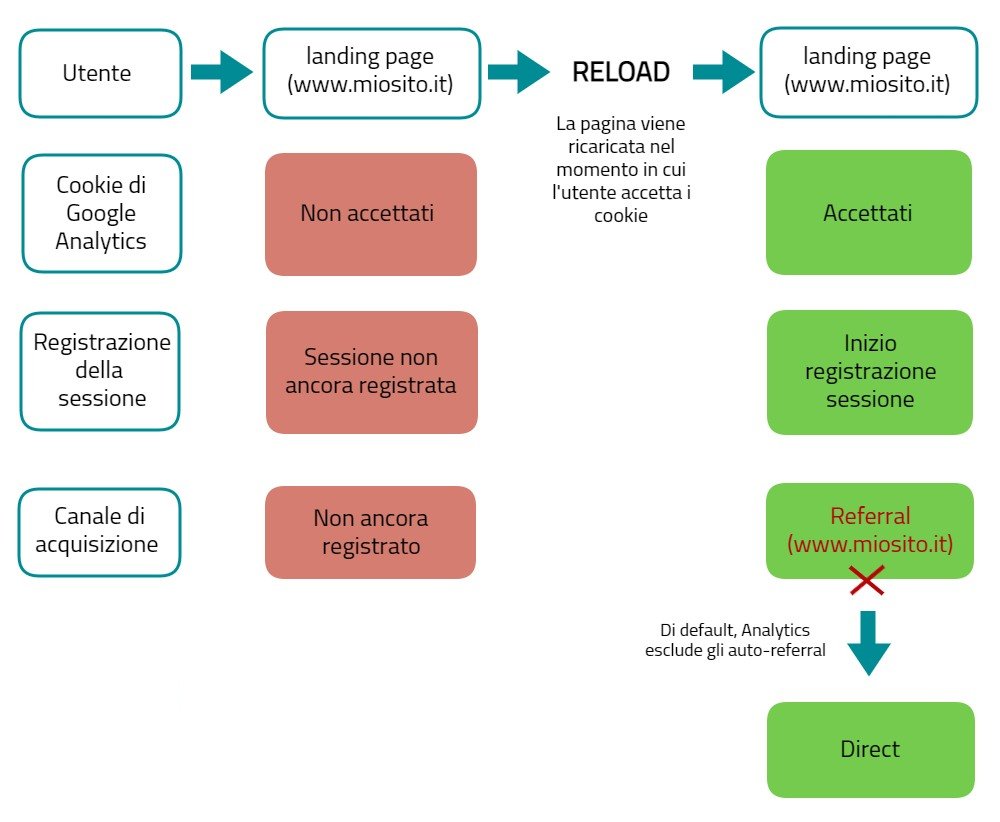
The solution? Don’t reload the page after cookie acceptance. This way, Analytics can correctly identify the acquisition channel once tracking is initiated.
9. Visits from Pages with 302 Redirects, Meta Tag Redirects, or Javascript Redirects
Using 302 Redirects or redirects via Meta tags or Javascript is more likely to lose referrer information. If this happens, the visit will be mistakenly attributed to the direct channel. The best solution is to set up a server-side 301 Redirect, which can retain referrer information.
10. Links with the “noreferrer” Attribute
If a link contains the attribute rel=”noreferrer” in its source code, the user’s browser won’t pass referrer information, and Analytics won’t be able to identify the correct traffic source.
In Conclusion
While direct traffic also includes high-value users, it’s important to be aware of the real nature of this channel.
So, be cautious if Direct appears to be the main acquisition channel in your Analytics. While this data could indicate good brand awareness, it could also be due to tracking errors or omissions, and in any case, it inevitably includes a non-negligible amount of traffic from other sources, as explained above.
Do you want to make your Google Analytics data analysis even more precise? Discover how to accurately evaluate bounce rate or how to eliminate spam traffic from your reports.
Table of contents